 Ask AI
Semantic data extraction
Last updated: May-21-2026
When you upload an asset to Cloudinary, the upload API response includes basic information about the uploaded image such as width, height, number of bytes, format, and more. By default, the following semantic data is automatically included in the upload response as well: ETag, any face or custom coordinates, and the number of pages (or layers) in "paged" files.
Cloudinary supports extracting additional semantic data from the uploaded image such as: media metadata (including Exif, IPTC, XMP and GPS), color histogram, predominant colors, custom coordinates, pHash image fingerprint, and face and/or text coordinates. You request the inclusion of this additional information in the upload response by including one or more optional parameters.
You can request data extraction while uploading an image, or by using the explicit method on an already uploaded image.

Clara Denari's Mystery Game: The Sapphire Earring Match
Clara found sapphire earrings in her backyard. Her neighbor, Mrs. Patterson, claims they're hers, a family heirloom, and has an old photo to prove it. Clara restored the blurry photo using Cloudinary's AI. They look pretty similar, but something feels off...
Help Clara confirm whether it's an exact match. Extract the earrings from the photo and analyze their exact color to see if Mrs. Patterson's story holds up!
Data extraction while uploading
The following example uploads an image and requests the pHash value, a color analysis, and the media metadata:
phash directly in the unsigned request. Instead, define it in the upload preset. To do this via the Upload preset UI in the Console, enable Perceptual hash so uploads using that preset return phash in the response.Compare pHash values
The phash value is a perceptual fingerprint that you can compare across images.
To measure how different two pHash values are, calculate the Hamming distance between the hexadecimal values. A distance of 0 means the hashes are identical. For example:
Data extraction on already uploaded images
There are two ways to request data extraction on already uploaded images:
- Use the Explicit method of the Upload API to request data extraction on a single asset. This method is not rate-limited and requires a signature to be generated on the server side.
- Use the Update resources method of the Admin API. This method is rate-limited and requires your API key and secret, so is not suitable for use in client-side code.
Explicit example
The following example uses the Explicit method of the Upload API to request the pHash value, a color analysis, and the media metadata on an uploaded image with a public ID of "couple1":
Update resources example
The following example uses the Update resources method of the Admin API to request the pHash value, a color analysis, and the media metadata on an uploaded image with a public ID of "table":
Sample response
The following is an example of a JSON response returned with the following additional information: media_metadata, colors,and phash:
Clara Denari mini-mystery game


🔍 Evidence to Analyze
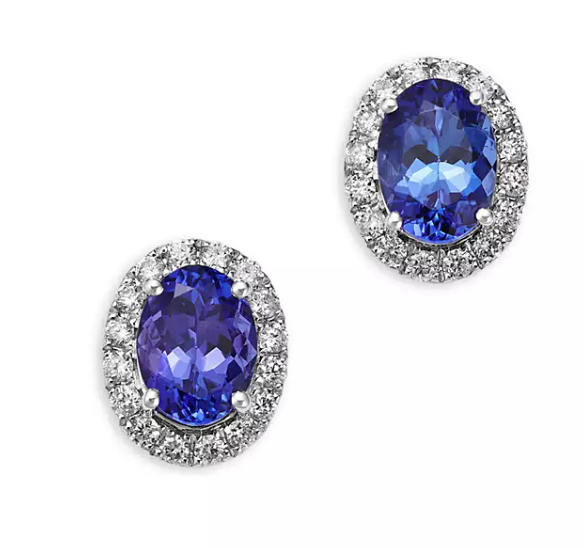
My earrings

Restored photo
📸 Source Image
earrings_restored.png
✂️ Extracted Earring
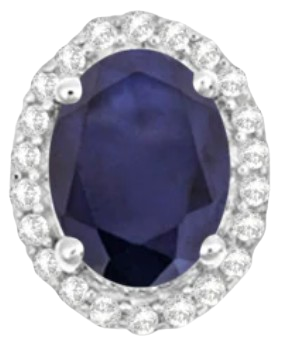
Upload this image
Source: https://res.cloudinary.com/demo/image/upload/e_extract:prompt_earring/c_crop,w_100,h_100,g_north_west,x_355,y_385/f_auto/q_auto/earrings_restored.png
📊 Color Analysis Response
{
  "asset_id": "a1b2c3d4e5f6g7h8i9j0",
  "public_id": "cropped_earrings",
  "version": 1763564796,
  "width": 100,
  "height": 100,
  "format": "jpg",
  "resource_type": "image",
  "created_at": "2024-01-15T10:30:00Z",
  "bytes": 12345,
  "type": "upload",
  "url": "http://res.cloudinary.com/.../cropped_earrings.jpg",
  "secure_url": "https://res.cloudinary.com/.../cropped_earrings.jpg",
  "asset_folder": "evidence",
  "colors": [
    ["#FCFCFB", 53.9],
    ["#404169", 25.0],
    ["#E3E3EA", 10.3]
  ],
  "predominant": {
    "google": [["white", 73.0], ["blue", 18.8]],
    "cloudinary": [["white", 73.0], ["blue", 18.8]]
  },
  "original_filename": "cropped_earrings"
}🔬 Color Analysis Results
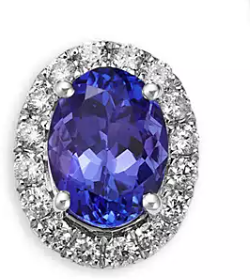
#3B3D81
My earrings
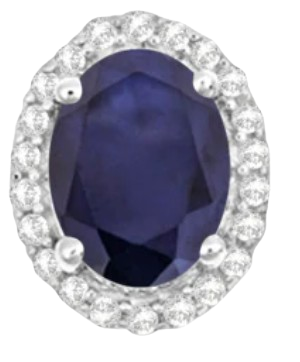
#404169
Photo earrings
Note: This mini‑mystery uses a simulated upload. In real apps, authenticate uploads with your Cloudinary API key and secret on a secure server, and never expose those credentials in client‑side code.
🎊 Case Closed!
The earrings Clara found are NOT the same as Mrs. Patterson's grandmother's earrings. Clara gets to keep her treasure!
See the blog post on API for extracting semantic image data - colors, faces, Exif data and more for more information on semantic data extraction.
Error
Rate this page:
