 Ask AI
Product Gallery changelog
Last updated: Oct-26-2026
This changelog covers the new features, enhancements, and fixes of each major and minor Product Gallery release.
v2.0
v2.0.2
Oct-26-2026
Bug fix release for the script embed (all.js). The npm package is unchanged in behavior.
-
Fix: Calling
hydrate()with the script embed no longer fails. It previously rejected with aReferenceError. The server-rendered markup was still hydrated, butviewportBreakpointswere never applied anddestroy()had no effect.hydrate()now resolves, breakpoints apply, anddestroy()removes the gallery.
v2.0.1
Oct-26-2026
This patch release helps customers moving from v1 to v2. A page that sets nothing new renders exactly as in v2.0.0. The thumbnail and loading fixes are in both the script embed and the npm package. The useLegacyV1Mode parameter, the restored v1 APIs, and the image.js file apply to the script embed only.
-
New parameter:
useLegacyV1Mode(deprecated), a temporary migration aid for script embeds whose own CSS or JavaScript depends on v1's internal markup, such as v1data-testattributes or class names. Cloudinary plans to remove it in a future major version. See the reference and Migrating from v1. -
Enhancement: The
configandoptionsproperties are back on the object thatcloudinary.galleryWidget()returns, as in v1, so pages that read or write them work again. -
Enhancement:
cloudinary.galleryWidgetInfo.ENUMS, v1's named constants, is back for pages written against v1. -
Fix: Thumbnails use
thumbnailProps.widthandthumbnailProps.heightagain. v2.0.0 ignored them. - Fix: The selected-thumbnail border is no longer clipped at the edges.
- Fix: Video thumbnails load. v2.0.0 requested a broken image URL.
- Fix: The loading blur for thumbnails larger than 150px uses the thumbnail's shape instead of the main viewer's shape.
-
Fix: Cloudinary now serves an empty
image.jsfile next toall.js, so pages that preload v1'simage.jsno longer get a 404.
v2.0.0
Oct-19-2026
product-gallery-v2.cloudinary.com) and an npm package (@cloudinary/product-gallery). It runs alongside v1 and doesn't replace it automatically. v1 is now in security maintenance mode: it receives security updates only, and all new features and bug fixes go into v2. v2 keeps the same configuration API, methods, and events as v1.3.4, so most script-embed integrations upgrade without code changes. See Migrating from v1.-
New feature: npm package (
@cloudinary/product-gallery) for React and Next.js apps, in addition to the existing script embed. See Choosing a distribution. -
New feature: Server-side rendering support via
resolveConfig()and theGallerycomponent. See Server-side rendering with React and Next.js. -
New feature: CSS customization with stable, human-readable class names and CSS custom properties, scoped under a
.pgwroot class. See Customizing with CSS. -
New parameter:
viewerWidthHint, for server-side rendering only. See the reference. -
Enhancement: Sizing is now CSS-driven (
width: 100%plusaspectRatio) instead of JavaScript-measured pixel dimensions. See Sizing and responsiveness. -
Enhancement: Native responsive images using
srcsetandsizes, so the browser picks the appropriate derived asset instead of a JavaScript measure-then-request flow. No configuration change required.
v1.3
v1.3.3
Oct-27-2025
-
Enhancement: Allow 3D model auto-rotation using
autoRotate: true. -
Enhancement: Add zoom buttons to the 3D viewer using
showZoomButtons: true. - Enhancement: Use accumulative shadow by default in the 3D viewer.
-
Enhancement: Add 3D model loaded event:
3dmodelloaded. -
Enhancement: Add AR button click event:
onArClick. -
Enhancement: Add AR QR code ready event:
onQrReady. - Enhancement: Make the active image focusable.
- Fix: No longer throw an error when unable to create a placeholder for an asset.
v1.2
v1.2.11
Oct-23-2025
- Enhancement: Zoom popup asset heights are now rounded to the nearest breakpoint (default: 100px) to reduce the number of required asset transformations.
- Fix: Zoom popup +/- buttons now respond to Enter and Space keys when focused, improving keyboard accessibility.
- Fix: On iOS, the native video player now correctly displays the video poster as configured, matching the behavior of the Cloudinary Video Player.
- Fix: Asset versions are now respected when retrieving assets by tag; the widget displays the correct version returned from the asset list.
v1.2.9
Mar-9-2025
- Enhancement Improve scroll/swipe touch-handling behaviors in mobile.
- Fix: Fixed an issue where transformations provided via configuration object weren't passed through to the zoom popup.
v1.2.8
Jan-27-2025
- Enhancement: Swipe/scroll touch gestures handling improved in iOS Safari on iPhones.
v1.2.5
Jan-16-2025
- Enhancement: Touch gestures were enhance to prevent vertical page-scroll when horizontally swiping the gallery.
v1.2.3
Jan-08-2025
-
New feature: Added 5 new methods to allow programmatically setting the current asset in the display or for getting info about the currently displayed asset:
setItem(index)nextItem()prevItem()getActiveItem()getActiveIndex()
v1.2.2
Dec-03-2024
- New feature: Pinch to zoom to allow multi-zoom on mobile. Previously, multi-zoom was available only for desktop using +/- buttons. Now end users can also use multi-zoom on touch devices by pinching.
- Enhancement: Improved gesture handling logic. Swipe and other zoom and carousel-transitions are more performant and much smoother.
- Fix: Prevent double loading of assets. When configuring a gallery with a zoom popup and not preloading assets, the assets that are behind an open popup won't render. This is a huge improvement for galleries with zoom-popup and many hard-to-render assets, like videos and 3D models.
v1.1
v1.1.36
Nov-04-2024
-
New feature: Endless looping carousel. Allows you to configure the previous/next buttons to always be available, so that when a user reaches the start/end of the carousel it jumps back to the first/last item. Enable looping by setting
carouselLoop: 'jump'(example) -
New feature: Popup initial zoom. Allows users to request that the zoom popup opens already zoomed in. Enable initial zoom by configuring
zoomPopupProps: { initialZoom: true }(example) - Fix: Improved swipe handling for iOS devices.
- Maintenance: Updated many dependencies.
v1.1.28
Oct-27-2024
-
New feature: To improve performance, you can now control an asset's
fetchPriorityproperty, which tells the browser the order to fetch assets, either earlier (high) or later (low). By default,fetchPriorityis automatically set tohighon the first image in a gallery. -
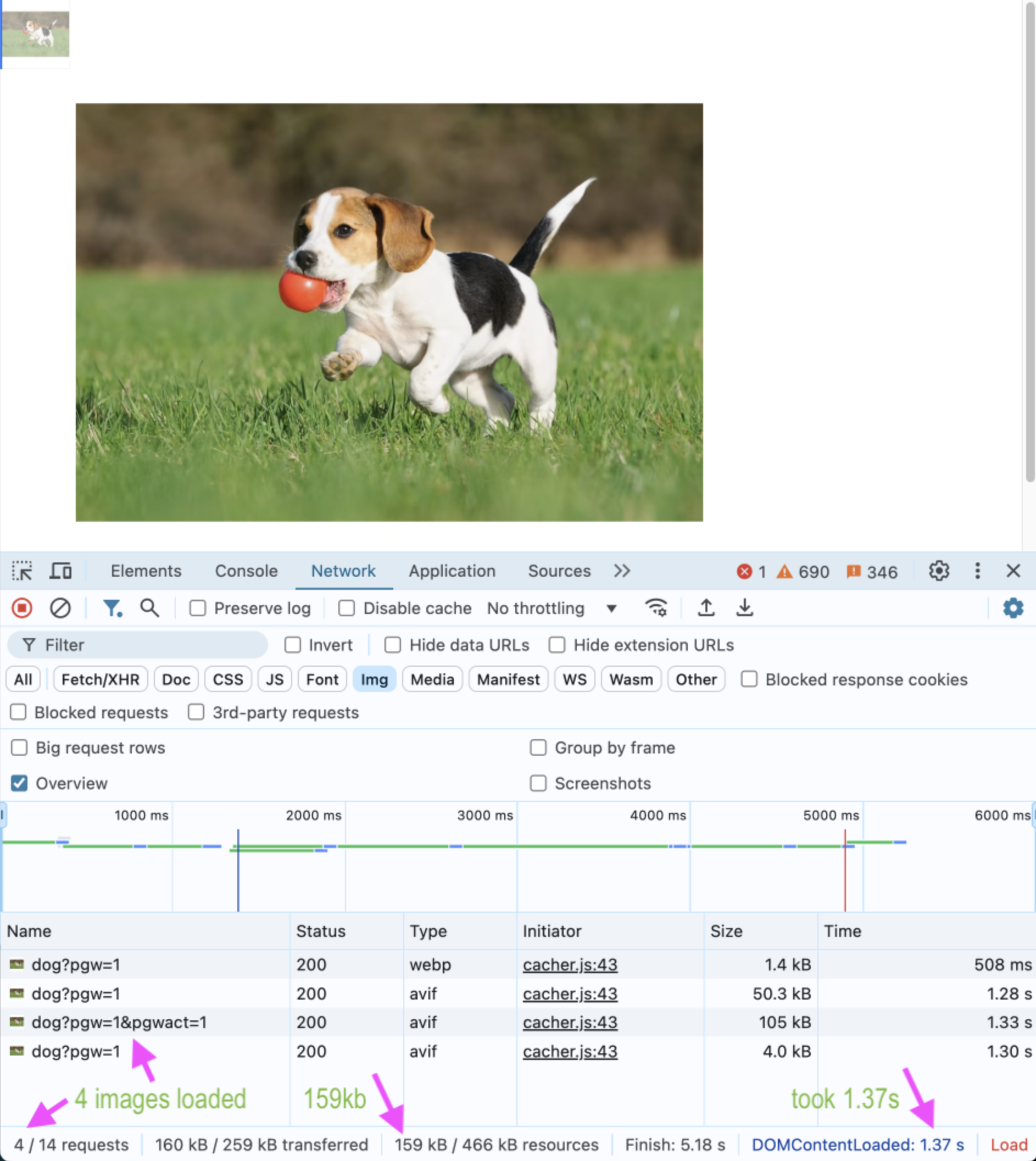
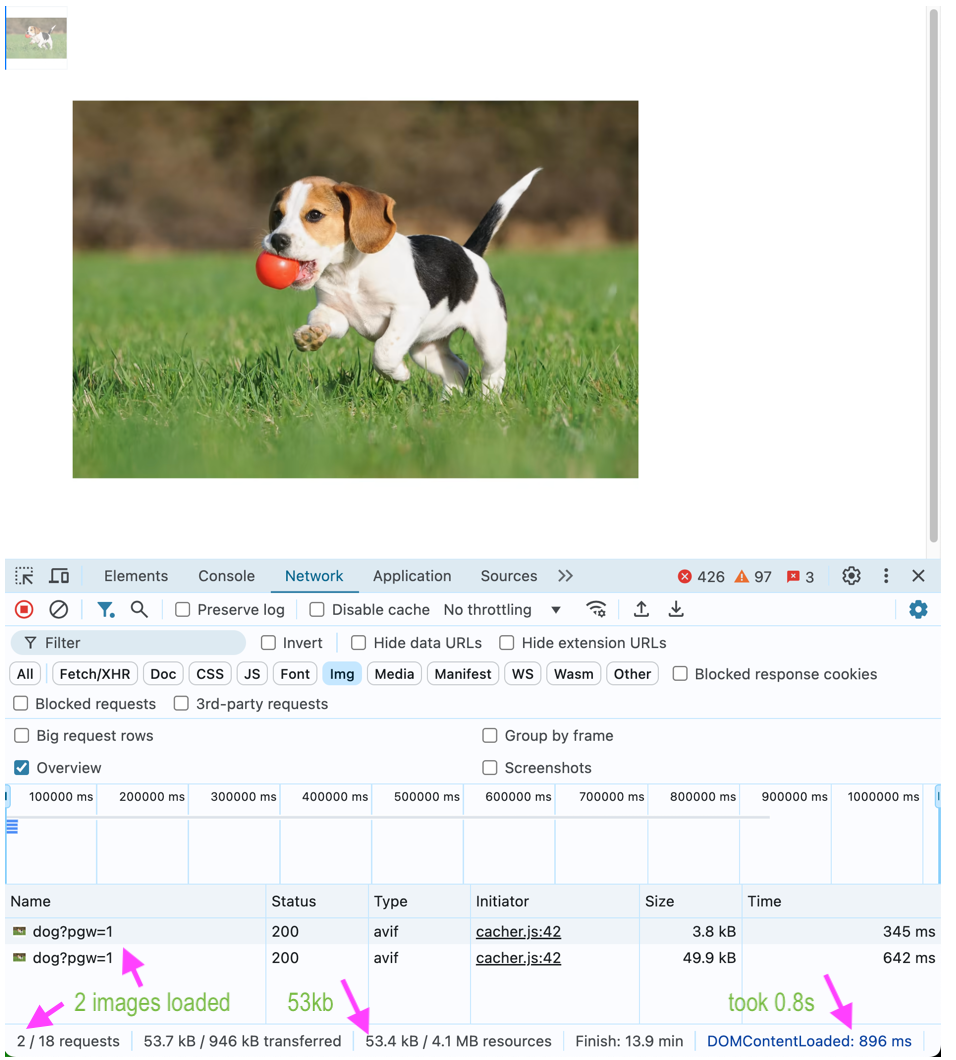
Enhancement: Improved render flow - optimized image loading:
- If a thumbnail image is available, the Product Gallery also uses that image as the placeholder image, making only a single request for an image, instead of 2 requests.
- The Product Gallery now loads the zoom image on-demand only when needed, postponing the request of the bigger zoom image.
- Results of testing a minimal gallery with a single asset:
v1.1.26
Oct-13-2024
- Enhancement: Major refactor to the carousel component, swipe/scroll logic, and state management, for improved performance and user experience, and prevents a noticeable delay in the active-index indicator interface (before/after).
- Fix: Addressed reported issues with inline zoom when using a mouse on touch-enabled laptops.
Register for notifications
Make sure you always know when we publish new a changelog with the Product Gallery Changelog RSS feed:
 Grab this RSS link to watch for updates to the Product Gallery changelog in your favorite RSS reader.
Error
Rate this page:
